CircuiTikZ
version 1.8.7 (2026/09/12)
1 Introduction
Lorenzo and Mirella, 57 years ago, started a trip that eventually lead to a lot of things — among them, CircuiTikZ v1.0.
In loving memory — R. G., 2020-02-04
1.1 About
CircuiTikZ was initiated by Massimo Redaelli in 2007, who was working as a research assistant at the Polytechnic University of Milan, Italy, and needed a tool for creating exercises and exams. After he left University in 2010 the development of CircuiTikZ slowed down, since LaTeX is mainly established in the academic world. In 2015 Stefan Lindner and Stefan Erhardt, both working as research assistants at the University of Erlangen-Nürnberg, Germany, joined the team and now maintain the project together with the initial author. In 2018 Romano Giannetti, full professor of Electronics at Comillas Pontifical University of Madrid, joined the team.
The use of CircuiTikZ is, of course, not limited to academic teaching. The package gets widely used by engineers for typesetting electronic circuits for articles and publications all over the world.
1.2 License
Copyright © 2007–2026 by Massimo Redaelli, 2013–2026 by Stefan Erhardt, 2015–2026 by Stefan Lindner, and 2018–2026 by Romano Giannetti. This package is author-maintained. Permission is granted to copy, distribute and/or modify this software under the terms of the LaTeX Project Public License, version 1.3.1, or the GNU Public License. This software is provided “as is”, without warranty of any kind, either expressed or implied, including, but not limited to, the implied warranties of merchantability and fitness for a particular purpose.
1.3 Loading the package
| LaTeX | ConTeXt1 |
| \usepackage{circuitikz} | \usemodule[circuitikz] |
TikZ will be automatically loaded; additionally, the TikZ libraries calc, arrows.meta, bending, and fpu are loaded (the last one is used only on demand).
CircuiTikZ commands are just TikZ commands, so a minimum usage example would be:

There is really no support for Plain TeX — the maintainers are willing to consider patches if somebody is interested.
1 ConTeXt support was added mostly thanks to Mojca Miklavec and Aditya Mahajan. Please notice that since ConTeXt switched to the new lmtx engine (March 2023), there can be problems to compile TikZ with some version; in May 2023 the problem has been fixed. Please check this issue for details.
1.4 Installing a new version of the package.
The stable version of the package should come with your LaTeX distribution. Downloading the files from CTAN and installing them locally is, unfortunately, a distribution-dependent task and sometimes not so trivial. If you search for local texmf tree and the name of your distribution on https://tex.stackexchange.com/ you will find a lot of hints.
Anyway, the easiest way of using whichever version of CircuiTikZ is to point to the GitHub page https://circuitikz.github.io/circuitikz/ of the project, and download the version you want. You will download a simple (biggish) file, called circuitikzgit.sty.
Now you can just put this file in your local texmf tree, if you have one, or simply adding it into the same directory where your main file resides, and then use
\usepackage[...options...]{circuitikzgit}
instead of circuitikz. This is also advantageous for “future resilience”; the authors try hard not to break backward compatibility with new versions, but sometimes, things happen.
1.5 Requirements
-
• latex (if using it), version from 2019-10-01 (better from 2020-10-01);
-
• tikz, version \({}\ge {}\)3.1.5b (it should work with any version from 3.1.4b and up, but better use a newer one);
-
• xstring, not older than 2009/03/13;
-
• siunitx, if using siunitx option (better v2 or newer).
A similar approach for ConTeXt is available, with the file t-circuitikzgit.tex; the compatibility in this case is not guaranteed, but provided on a best effort base.
This manual has been typeset with CircuiTikZ 1.8.7 (2026/09/12) on TikZ 3.1.12 (2026-08-01), using global options [RPvoltages, siunitix].
1.6 Incompatible packages
TikZ’s own circuit library, which was based on CircuiTikZ, (re?)defines several styles used by this library. In order to have them work together you can use the compatibility package option, which basically prefixes the names of all CircuiTikZ to[] styles with an asterisk.
So, if loaded with said option, one must write (0,0) to[*R] (2,0) and, for transistors on a path, (0,0) to[*Tnmos] (2,0), and so on (but (0,0) node[nmos] {}). See example at page (page for section 10.8).
Anyway, the compatibility code is a best effort task and only very lightly tested — the authors advice is to choose one or the other, without mixing them.
Another thing to take into account is that any TikZ figure (and CircuiTikZ ones qualify) will have problems if you use the babel package with a language that changes active characters (most of them). The solution is normally to add the line \usetikzlibrary{babel} in your preamble, after loading TikZ or CircuiTikZ. This will normally solve the problem; some languages also require using \deactivatequoting or the option shorthands=off for babel. Please check the documentation of TikZ or this question on TeX stackexchange site.
Finally, the TikZ library bending is loaded by the package, and its effects (the bending of the arrows on curved paths) will also affect the rest of your drawings.
1.7 Related and extension packages
1.7.1 Related packages
At the Friedrich-Alexander-Universität, a group of developers are implementing a graphical user interface to draw circuits with CircuiTikZ. You can find more information in this GitHub issue or, better, on their main site. You can try out the GUI here.
A group at the University of Colorado Colorado Springs (UCCS) are building a cross-platform desktop editor called Heaviside to draw circuit diagrams with CircuiTikZ. You draw the schematic on a grid and it generates the corresponding CircuiTikZ code, with a live preview of the compiled figure. It integrates into LaTeX, Overleaf, and LyX workflows. More information and downloads are on its GitHub page.
1.7.2 Extension packages
CircuiTikZ is meant to be, as much as possible, format-agnostic (which means that it can be used from LaTeX, plain TeX and ConTeXt). It is growing in functionality and components, but not everything can be added to the package. In this section, there is a list of packages, available at CTAN, that extend or enhance CircuiTikZ but are distributed separately.2
- tikzquads
-
is a package for easily drawing the equivalent electrical circuits for quadrupoles and similar blocks. LaTeX only.
- tikzdotncross
-
offers a few alternative ways for declaring and marking coordinates and drawing a line with "jumps" over an already existent path3. LaTeX only.
2 If you have a package or know a package that should be listed here, please contact the CircuiTikZ authors, or, better, send a pull request to the project and it will be added.
3 …read the introduction: try not to overuse the jumping symbol; it’s not a standard for the last 25 years. Nevertheless, sometimes is very useful, especially for didactic reasons (Romano’s personal opinion in this comment).
1.8 Known bugs and limitation
CircuiTikZ will not work correctly with global (in the main circuitikz environment, or in scope environments) negative scale parameters (scale, xscale or yscale), unless transform shape is also used, and even in this cases the behavior is not guaranteed. Neither will it work with angle-changing scaling (when xscale is different form yscale) and with the global rotate parameter.
Correcting this will need a big rewrite of the path routines, and although the authors are thinking about solving it, don’t hold your breath; it will need changing a lot of interwoven code (labels, voltages, currents and so on). Contributions and help would be highly appreciated.
Hopefully most of the issues with compatibility between CircuiTikZ and the pic TikZ feature should have been solved in v1.8.0, but the feature is only lightly tested (see example 10.10).
Also, notice that several components will interact in a funny way with global path options. Depending on the specific component, some parameters are inherited by the internal shape, and some others are reset. This is not easy to fix in general. We want some options to go through — fill color, dashed pattern for example — and some others to stay only in the outer path; and if the background shape needs some option for drawing the internal shape, like for example a rounded corner, it must reset the external option. So there is no perfect solution, although since v1.5.0 the shapes have been “robustified”, so that by default arced corners and arrows parameters will not be propagated into the shape. Arrows with to[] components don’t work, anyway, so basically avoid this situation. In some cases, also the engine you are using (as pdflatex, xelatex, and so on) can impact coloring in corner cases (or even not so in the corner, like in american-style voltage source signs).
\begin{circuitikz}[]
    \draw (0,3) to[R] ++(3,0) node[npn, anchor=B]{};
    % arrows will not work and give strange results
    % so basically do not use them!
    \draw[<->] (0,1.5) to[R] ++(3,0) node[npn, anchor=B]{};
    \draw[shorten <=10pt] (0,0) to[R] ++(3,0)
         node[npn, anchor=B]{};
\end{circuitikz}
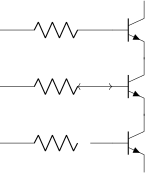
Lastly, voltage styles interacts in strange ways with general (such as american, european style), in the sense that sometimes the order in which you enact them is important. That should be arguably fixed, but it will change (read break) a lot of existing code, so it’ll stay; more information and workarounds in section 5.5.7.
As a final notice, if you want to use the externalize library, do not use the circuitikz environment: use tikzpicture (which is really the same thing, see the FAQ 8.3).
1.9 Scale factor inaccuracies
Sometimes, when using fractional scaling factors and big values for the coordinates, the basic layer inaccuracies from TeX can bite you, producing results like the following one:
\begin{circuitikz}[scale=1.2, transform shape,
    ]
    \draw (60,1) to [battery2, v_=$V_{cc}$, name=B] ++(0,2);
    \node[draw,red,circle,inner sep=4pt] at(B.left) {};
    \node[draw,red,circle,inner sep=4pt] at(B.right) {};
\end{circuitikz}

A general solution for this problem is difficult to find; probably the best approach is to use a scalebox command to scale the circuit instead of relying on internal scaling.
Nevertheless, Schrödinger’s cat found a solution which has been ported to CircuiTikZ: you can use the key use fpu reciprocal which will patch a standard low-level math routine with a more precise one.
\begin{circuitikz}[scale=1.2, transform shape,
    use fpu reciprocal,
    ]
\draw (60,1) to [battery2, v_=$V_{cc}$] ++(0,2);
\end{circuitikz}

The use fpu reciprocal key seems to have no side effects, but given that it is patching an internal interface of TikZ it can break any time, so it is advisable to use it only if and when needed.
1.10 Incompatibilities between versions
Here, we will provide a list of incompatibilities between different versions of CircuiTikZ. We will try to hold this list short, but sometimes it is easier to break with old syntax than include a lot of switches and compatibility layers. In general, changes that would invalidate a circuit (changes of polarity of components and so on) are almost always protected by a flag; the same is not true for purely aesthetic changes. If unsure, you can check the version in your local installation by using the macro \pgfcircversion{}.
-
• In version 1.8.2, all the text anchors of the components have been made stable, meaning they are meaningful after the component has been drawn.4 That was the case only for part of the components. It shouldn’t affect anything for standard usage, but according to the TikZ manual, “this is the way”. Almost no text (see below) should change position (see also section 3.2.2.1).
Two minor changes are that the previously incorrectly described text anchor for flowarrow is not where it used to be shown (use anchor center instead); and that the anchors for oscillator and gridnode, which were completely bogus, have been fixed.
-
• In version 1.8.0, the path routines changed to allow using path-style components in TikZ’s pic. The change is a big one, so a rollback point (see below) for v1.7.2 has been added.
-
• In version 1.7.2, the drawing of the “double-zero” source components voosource, ioosource, and oosourcetran changed so that now the circle radius depend on the height and not on the width. If you didn’t play with internal parameters, that should be invisible.
-
• In version 1.7.1, the default widths of barrier and openbarrier were reduced so that no wire is drawn as part of the symbols by default. This is accompanied by a change to the meanings of the configuration keys bipoles/barrier/width, bipoles/barrier/height and bipoles/openbarrier/gap (as well as the new key bipoles/openbarrier/width). The change avoids problems when using barriers on short pieces of path or as nodes, cf. the details in the relevant pull request on GitHub. The new default values are chosen such that the components are identical to the default appearance before the change.
-
• Since version 1.6.3 the default symbol for the minus sign changed from the simple $-$ to $\vphantom{+}-$. The reason is that in some (most?) font, the minus sign is enclosed in a smaller bounding box than the plus sign and that leads to poorly aligned minus symbols in american and raised voltages. This was not noticed before because the two symbols share the same bounding box in the default Computer Modern font. You can look at this issue on GitHub for more details; if you want to go back to the previous definitions you can write
\ctikzset{amplifiers/minus=$-$} \ctikzset{bipoles/cvsourceam/inner minus=$-$} \ctikzset{bipoles/vsourceam/inner minus=$-$} \ctikzset{voltage/american minus=$-$} -
• Since version 1.6.3 the size of the solder dot and the connection dot of the body diodes for transistors has changed (now they are the same and are configurable). The new default scale of 0.7 makes the dots area more or less one half the one of the external connections. You can go back to the previous values with
\ctikzset{transistor bodydiode/dot scale=0.5, transistor solderdot scale=1.0} -
• Since version 1.6.2 siunitx will not work anymore with ConTeXt (it was a very poor simulation layer, anyway); it has been disabled in upstream ConTeXt, in favor of its own units module.
-
• Version 1.6.0 has a big rewrite of the block’s code. In principle the changes are backward-compatible, but there were several bugs (wrong anchors, errors with rotations, and so on) that have been fixed in the process.
-
• Since v1.5.15 color management (see section 7) and the details of how the shapes are drawn and protected by the external drawing options has changed. There should be no substantial changes to the circuits, though.
-
• The TikZ fix for to[...] +(x,y) behavior (see 3.1.3) uncovered a bug in the positioning of the labels in CircuiTikZ that had been present since v0.8. So you must upgrade to v1.4.1 or better if you have TikZ newer than 3.1.8 (and you want/need to use the +(x,y) syntax).
-
• There have been changes in (internal) parameters for capacitors in v1.4.1; now to change them you should use the style interface (see 4.3.3).
-
• CircuiTikZ v1.4.0 introduced the rollback system for the package when using LaTeX; that (at least in principle) should be completely backward-compatible.
-
• The path construction in v1.4.0 has been changed a bit (again). The change shouldn’t break any circuit and will correct a behavior that should have been fixed with the v1.2.1 change (see below).
-
• Version 1.3.6 fixes several problems with the stacked labels; the most important change is that now the bracing of arguments is respected as in version 1.3.0 for the other labels. The special treatment in stacked labels (and only in stacked labels!) for the (still experimental6) siunitx compact syntax <...> has been removed: it was completely buggy before, and silently ignored, now will throw an error.
-
• Version 1.3.3 fixes the direction of the arrows in tunable elements; before this version, they were more or less random, now the arrow goes from bottom left to top right. You have the option to go back to the old behavior with \ctikzset{bipoles/fix tunable direction=false}. As a compensation for the fuss, now the arrows are configurable. To learn more, see the FAQ: 8.6.
-
• Version 1.3.1 removes the warning if you do not specify a voltage direction.
-
• Version 1.3.0 fixes the buggy stripping of braces from labels and annotations (see 5.1.2).
-
• After 1.2.7 a big code reorganization (which had the collateral effect of fixing some bugs) has been made; no changes should be visible, but a fallback point at 1.2.7 has been added.
-
• You must upgrade to v1.2.7 or newer if you use a TikZ 3.1.8 or 3.1.8a (but better upgrade both packages to the current version). You can check the TikZ version installed using the macro \pgfversion.
-
• After v1.2.1: Important: the routine that implements the to[...] component positioning has been rewritten. That should enhance the line joins in paths, and it’s safer, but it can potentially change some old behavior.
One of the changes is that the previous routine did the wrong thing if you used (node) to[...] (you should use an anchor or a coordinate, not a node there — like (node.anchor) to[...]).
The other one was that in the structure ... to[...] node[pos=something] (coord) the value of pos was completely wrong (even if you don’t use pos explicitly, remember it’s pos=0.5 by default).
Additionally, the old code disrupted the TikZ path-fill mechanism, so that you could get away with using the fill option on paths and having just the components filled, not the path. That was incorrect, although sometime it was handy (sorry).
See the FAQ at section 8.1 for more information.
-
• After v1.2.0: voltage arrows, symbols and label positions are calculated with a rewritten routine. There should be little change, unless you touched internal values…
-
• After v1.1.3: from version 1.1.0 to version 1.1.2, the inverted Schmitt buffer in IEEE style ports was called inv schmitt (with an additional space). The correct name is invschmitt port (the same as the legacy american port).
-
• After v1.1.2: the position of american voltages for the open bipoles changed (you can revert to the old behavior, see section 5.5.5).
-
• After v0.9.7: the position of the text of transistor nodes has changed; see section 4.15.4.
-
• After v0.9.4: added the concept of styling of circuits. It should be backward compatible, but it’s a big change, so be ready to use the 0.9.3 snapshot (see below for details).
-
• After v0.9.0: the parameters tripoles/american or port/aaa, ...bbb, ...ccc and ...ddd are no longer used and are silently ignored; the same stands for the similarly named parameters in nor, xor, and xnor ports.
-
• After v0.9.0: voltage and current directions/signs (plus and minus signs in case of american voltages and arrows in case of european voltages) have been rationalized with a couple of new options (see details in section 5.2). The default case is still the same as v0.8.3, to avoid potentially wrong circuits, but you would be better off with one of the new voltage directions (EFvoltages or RPvoltages) for newer circuits.
-
• Since v0.8.2: voltage and current label directions (v<= / i<=) do NOT change the orientation of the drawn source shape anymore. Use the invert option to rotate the shape of the source. Furthermore, from this version on, the current label (i=) at current sources can be used independent of the regular label (l=).
-
• Since v0.7: The label behavior at mirrored bipoles has changed, this fixes the voltage drawing, but perhaps you will have to adjust your label positions.
-
• Since v0.5.1: The parts pfet, pigfete, pigfetebulk, and pigfetd are now mirrored by default. Please adjust your yscale-option to correct this.
-
• Since v0.5: New voltage counting direction, there exists an option to use the old behavior.
If you have older projects that show compatibility problems, you have two options:
-
• you can use an older version locally using the git-version and picking the correct commit from the repository (branch gh-pages) or the main GitHub site directly;
-
• if you are using LaTeX, the distribution has embedded several important old versions: 0.4, 0.6, 0.7, 0.8.3, 0.9.3, 0.9.6, 1.0, 1.1.2, 1.2.7, 1.4.6, and 1.7.2. To switch to use them, since v1.4.0 you simply use the new LaTeX kernel rollback system, changing your \usepackage invocation to something like:
            % or v0.4, v0.6, ...
            \usepackage[]{circuitikz}[=v0.8.3]
You can also specify a date instead of a version number: if you write
\usepackage[]{circuitikz}[=2020/02/05]the rollback system will load the version that was current on February 5th, 2020 (in this case it will be v1.0 which was released the day before).
If for whatever reasons your kernel is older, you can still use the old method of loading the package-version package; for example:
           % or circuitikz-0.4, 0.6...
           \usepackage[]{circuitikz-0.8.3}
which is an inferior solution because it can fool any package you use that depend on circuitikz.
Either way, you have to take care of the options that may have changed between versions (and sometime styles, if you use them).
-
• if you are using ConTeXt, only versions 0.8.3, 0.9.3, 0.9.6, 1.0, 1.1.2, 1.2.7, 1.4.6, and 1.7.2 are packaged; you can use it with
\usemodule[circuitikz-0.8.3]
4 The problem has been noticed by user @JPWiedemann on GitHub.
5 Do not use v1.5.0, it’s buggy.
6 and, really, not advised…
1.11 Feedback
The easiest way to contact the authors is via the official GitHub repository: https://github.com/circuitikz/circuitikz/issues. For general help question, a lot of nice people are quite active on https://tex.stackexchange.com/questions/tagged/circuitikz — be sure to read the help pages for the site and ask!
1.12 Package options
Circuit people are very opinionated about their symbols. In order to satisfy the individual taste you can set a bunch of package options.
There are arguably way too many options in CircuiTikZ, as you can see in the following list. Since version 1.0, it is recommended to just use the basic ones — voltage directions (you should specify one of them), siunitx (only for LaTeX), the global style (american or european) and use styles (see 3.3) for the remaining options.
The standard options are set by historical reason, and reflect the preferences of the author that introduced them. For example you get this (the default voltage orientation, see 5.2, is noold) :
\begin{circuitikz}
    \draw (0,0) to[R=2<\ohm>, i=?, v=84<\volt>] (2,0) --
    (2,2) to[V<=84<\volt>] (0,2)
    -- (0,0);
\end{circuitikz}
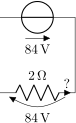
Feel free to load the package with your own cultural options:
| LaTeX | ConTeXt |
| \usepackage[american, RPvoltages]{circuitikz} | \usemodule[circuitikz][american, RPvoltages] |
\begin{circuitikz}
    \draw (0,0) to[R=2<\ohm>, i=?, v=84<\volt>] (2,0) --
    (2,2) to[V<=84<\volt>] (0,2)
    -- (0,0);
\end{circuitikz}
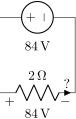
However, most of the global package options are not available in ConTeXt; in that case you can always use the appropriate \tikzset{} or \IndexKey{} command after loading the package.
Here is the list of all the options:
-
• europeanvoltages: uses arrows to define voltages, and uses european-style voltage sources;
-
• straightvoltages: uses arrows to define voltages, and and uses straight voltage arrows;
-
• americanvoltages: uses \(-\) and \(+\) to define voltages, and uses american-style voltage sources;
-
• europeanresistors: uses rectangular empty shape for resistors, as per european standards;
-
• americanresistors: uses zig-zag shape for resistors, as per american standards;
-
• europeaninductors: uses rectangular filled shape for inductors, as per european standards;
-
• americaninductors: uses “4-bumps” shape for inductors, as per american standards;
-
• cuteinductors: uses my personal favorite, “pig-tailed” shape for inductors;
-
• americanports: uses triangular logic ports, as per american standards;
-
• europeanports: uses rectangular logic ports, as per european standards;
-
• americangfsurgearrester: uses round gas filled surge arresters, as per american standards;
-
• europeangfsurgearrester: uses rectangular gas filled surge arresters, as per european standards;
-
• european: equivalent to europeancurrents, europeanvoltages, europeanresistors, europeaninductors, europeanports, europeangfsurgearrester;
-
• american: equivalent to americancurrents, americanvoltages, americanresistors, americaninductors, americanports, americangfsurgearrester;
-
• siunitx: integrates with SIunitx package. If labels, currents or voltages are of the form #1<#2> then what is shown is actually \SI{#1}{#2} (not supported in ConTeXt; it has been disabled in upstream ConTeXt, in favor of its own units module);
-
• fulldiode: the various diodes are drawn and filled by default, i.e. when using styles such as diode, D, sD, …Other diode styles can always be forced with e.g. Do, D-, …
-
• strokediode: the various diodes are drawn and stroke by default, i.e. when using styles such as diode, D, sD, …Other diode styles can always be forced with e.g. Do, D*, …
-
• emptydiode: the various diodes are drawn but not filled by default, i.e. when using styles such as D, sD, …Other diode styles can always be forced with e.g. Do, D-, …
-
• arrowmos: pmos and nmos have arrows analogous to those of pnp and npn transistors;
-
• noarrowmos: pmos and nmos do not have arrows analogous to those of pnp and npn transistors;
-
• fetsolderdot: draw solderdot at bulk-source junction of some transistors;
-
• nofetsolderdot: do not draw solderdot at bulk-source junction of some transistors;
-
• emptypmoscircle: the circle at the gate of a pmos transistor does not get filled;
-
• lazymos: draws lazy nmos and pmos transistors. Chip designers with huge circuits prefer this notation;
-
• legacytransistorstext: the text of transistor nodes is typeset near the collector;
-
• nolegacytransistorstext or centertransistorstext: the text of transistor nodes is typeset near the center of the component;
-
• straightlabels: labels on bipoles are always printed straight up, i.e. with horizontal baseline;
-
• rotatelabels: labels on bipoles are always printed aligned along the bipole;
-
• smartlabels: labels on bipoles are rotated along the bipoles, unless the rotation is very close to multiples of 90°;
-
• compatibility: makes it possibile to load CircuiTikZ and TikZ circuit library together.
-
• Voltage directions: until v0.8.3, there was an error in the coherence between american and european voltages styles (see section 5.2) for the batteries. This has been fixed, but to guarantee backward compatibility and to avoid nasty surprises, the fix is available with new options:
-
– oldvoltagedirection: Use old way of voltage direction having a difference between european and american direction, with wrong default labeling for batteries;
-
– nooldvoltagedirection: The standard from 0.5 onward, utilizes the (German?) standard of voltage arrows in the direction of electric fields (without fixing batteries);
-
– RPvoltages (meaning Rising Potential voltages): the arrow is in the direction of rising potential, like in oldvoltagedirection, but batteries and current sources are fixed to follow the passive/active standard;
-
– EFvoltages (meaning Electric Field voltages): the arrow is in the direction of the electric field, like in nooldvoltagedirection, but batteries are fixed;
If none of these option are given, the package will default to nooldvoltagedirection. The behavior is also selectable circuit by circuit with the voltage dir style.
-
-
• betterproportions7: nicer proportions of transistors in comparision to resistors; notice that this option is superseded by styles and it’s kept just for compatibility, do not use it in new projects;
The old options in the singular (like american voltage) are still available for compatibility, but are discouraged.
Loading the package with no options is equivalent to the following options: [nofetsolderdot, europeancurrents, europeanvoltages, americanports, americanresistors, cuteinductors, europeangfsurgearrester, nosiunitx, noarrowmos, smartlabels, nocompatibility, centertransistorstext].
In ConTeXt the options are similarly specified: current= european|american, voltage= european|american, resistor= american|european, inductor= cute|american|european, logic= american|european, arrowmos= false|true.